> ## Documentation Index
> Fetch the complete documentation index at: https://docs.sonderplan.com/llms.txt
> Use this file to discover all available pages before exploring further.
# API Clients
> Create and configure API clients to build custom applications using RESTful APIs, enabling flexible integration and development.
API clients allow you to integrate external applications or services with Sonderplan using our RESTful API. Each API client is assigned to a specific Sonderplan user, inheriting their user group permissions and ensuring that the external application can perform only actions authorized for that user. This provides a secure and precise mechanism for managing integration points, custom applications, and automated workflows.
We recommend creating separate API clients for each distinct use case or integration. By isolating API clients, you reduce risks associated with credential exposure or unauthorized access, and it becomes easier to audit and manage access, troubleshoot issues, and enforce precise permission scopes tailored to each integration scenario.
## Creating an API Client
1. Expand **Admin** then click **Integrations -> New -> Api Client**, the sidebar editor opens.
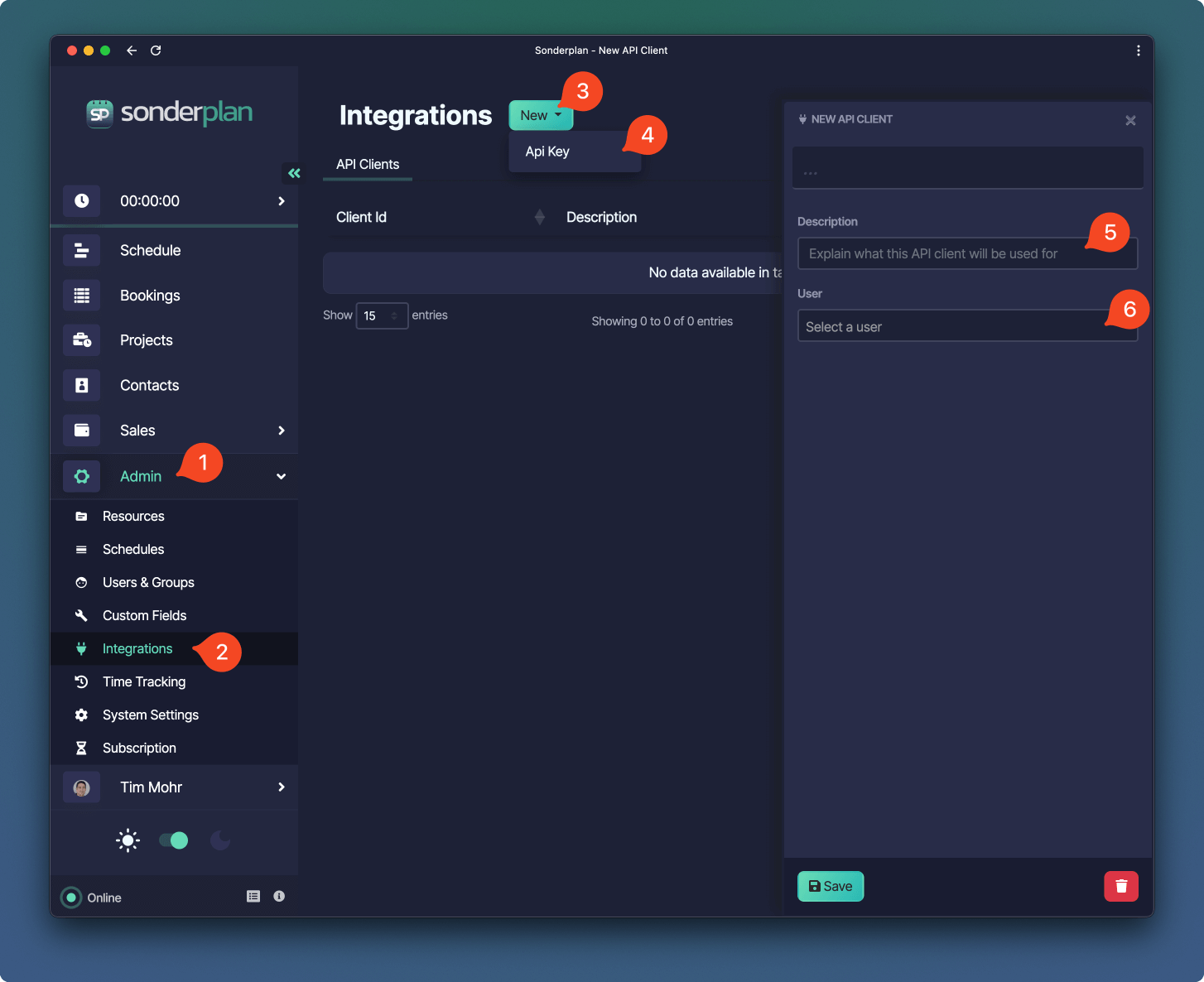 2. Enter a **description** on the purpose of the API Client, for example *"Zapier client"*
3. Select the **User** that this API Client should be linked to. The API Client will have the same permissions as the User
We recommend creating a dedicated user for your API integrations, placed in a User Group with the least permissions possible.
4. Click **Save** to create the API Client.
5. The Authentication Bearer Token is **displayed once only**. Be sure to copy the token before closing the API Client sidebar.
2. Enter a **description** on the purpose of the API Client, for example *"Zapier client"*
3. Select the **User** that this API Client should be linked to. The API Client will have the same permissions as the User
We recommend creating a dedicated user for your API integrations, placed in a User Group with the least permissions possible.
4. Click **Save** to create the API Client.
5. The Authentication Bearer Token is **displayed once only**. Be sure to copy the token before closing the API Client sidebar.
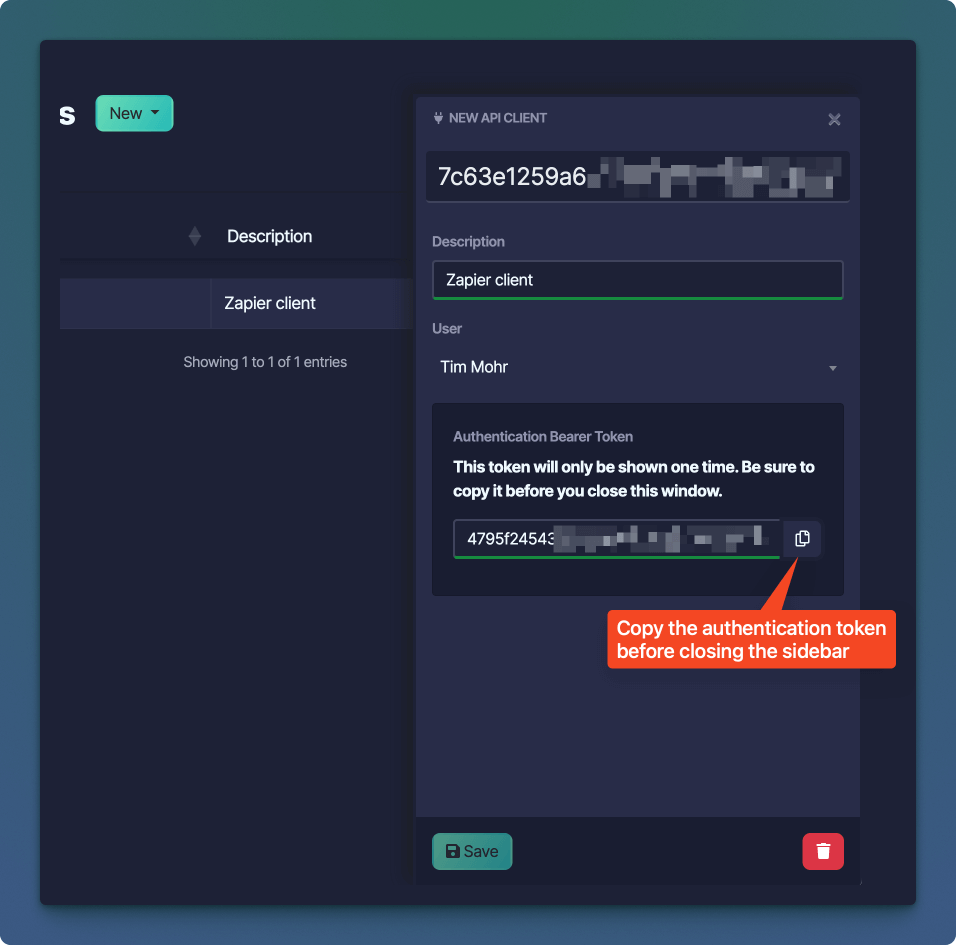 API Client tokens expire after a period of 5 years, but can be withdrawn and reset instantly.
## Modifying an API Client
It is currently only possible to modify the description of an existing API client.
To edit an API client:
1. Click the **Client Id** in the API Clients Data Table, this opens the API Client sidebar editor.
2. Edit the **Description** field
3. Click **Save**
## Deleting an API Client
Deleting an API Client immediately revokes the authentication token so that it can no longer be used to make requests to the Sonderplan REST API.
To delete an API client:
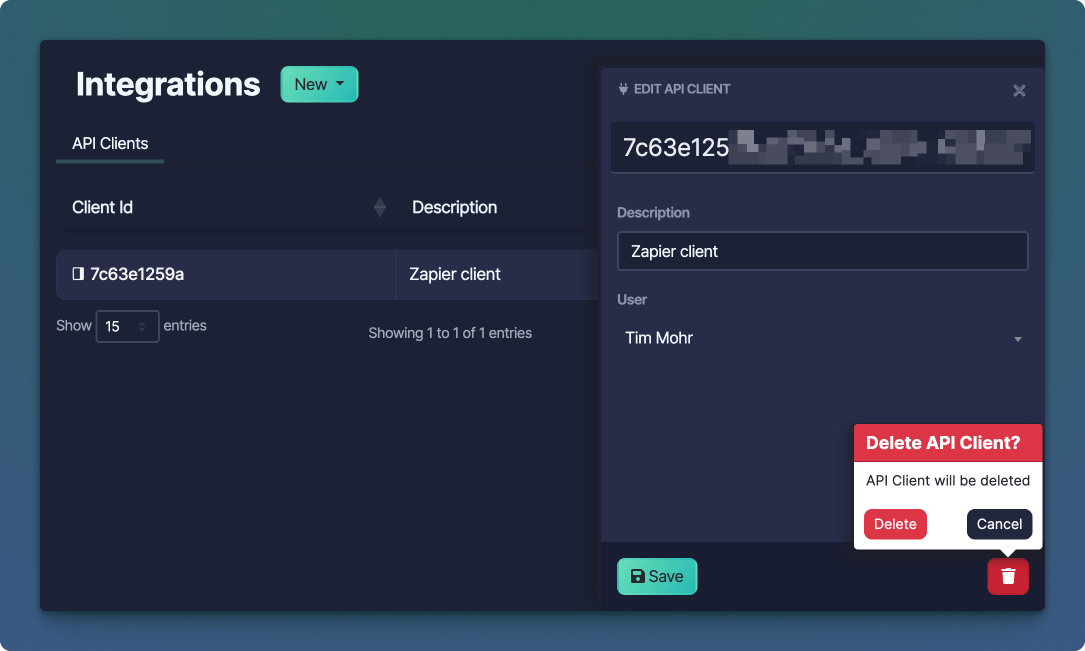
1. Click the **Client Id** in the API Clients Data Table, this opens the API Client sidebar editor.
2. Click the **** button in the bottom right corner of the editor.
3. Click the **Delete** button in the delete confirmation popover.
API Client tokens expire after a period of 5 years, but can be withdrawn and reset instantly.
## Modifying an API Client
It is currently only possible to modify the description of an existing API client.
To edit an API client:
1. Click the **Client Id** in the API Clients Data Table, this opens the API Client sidebar editor.
2. Edit the **Description** field
3. Click **Save**
## Deleting an API Client
Deleting an API Client immediately revokes the authentication token so that it can no longer be used to make requests to the Sonderplan REST API.
To delete an API client:
1. Click the **Client Id** in the API Clients Data Table, this opens the API Client sidebar editor.
2. Click the **** button in the bottom right corner of the editor.
3. Click the **Delete** button in the delete confirmation popover.
 ## Further Resources
Explore our comprehensive REST API documentation to learn how to build powerful integrations, automate tasks, and extend your companies capabilities.
Set up a new API client, integrate it with Zapier, and build a test Zap to automate workflows and streamline data connections.
## Further Resources
Explore our comprehensive REST API documentation to learn how to build powerful integrations, automate tasks, and extend your companies capabilities.
Set up a new API client, integrate it with Zapier, and build a test Zap to automate workflows and streamline data connections.