> ## Documentation Index
> Fetch the complete documentation index at: https://docs.sonderplan.com/llms.txt
> Use this file to discover all available pages before exploring further.
# Global Schedule Settings
> Configure settings including booking notifications, clash detection, and required fields to customise the scheduling experience to your team's needs.
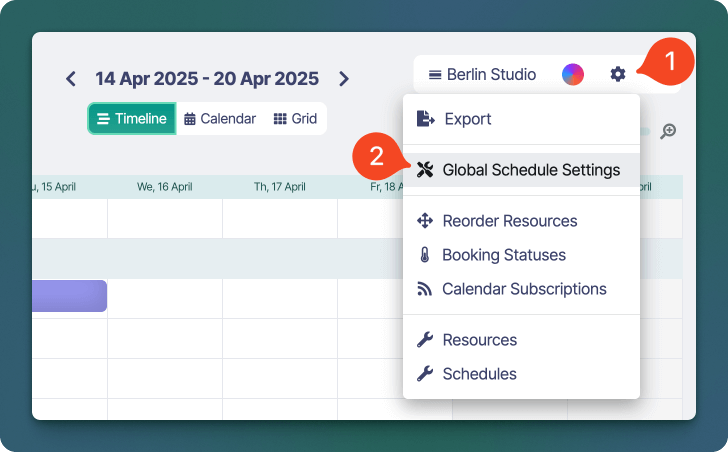
The *Global Schedule Settings* window allows administrators to customise settings that affect the **Schedule for all users**. To open this settings window go to **Schedule -> -> Global Schedule Settings**.
 ### Global Settings
The following settings are available in the Global Schedule settings window.
| Setting | Description | Options |
| --------------------------------------------- | ------------------------------------------------------------------------------------------------------------------------------------------------------ | ---------------------------------------------------------------------- |
| **Automatically calculate rates** | If enabled, Sonderplan will automatically calculate rates for each of the selected booking resources. | |
| **Enable booking notifications** | When set to yes, Sonderplan will send notification emails to any user / resources added to the booking. | |
| **BCC notification emails to administrators** | When set to yes, Sonderplan will BCC administrators on notification emails to any user / resources added to the booking. | |
| **Disable clash detection (resources)** | Use the Shift key to select one or more resource types for which booking clashes should not be checked for |
### Global Settings
The following settings are available in the Global Schedule settings window.
| Setting | Description | Options |
| --------------------------------------------- | ------------------------------------------------------------------------------------------------------------------------------------------------------ | ---------------------------------------------------------------------- |
| **Automatically calculate rates** | If enabled, Sonderplan will automatically calculate rates for each of the selected booking resources. | |
| **Enable booking notifications** | When set to yes, Sonderplan will send notification emails to any user / resources added to the booking. | |
| **BCC notification emails to administrators** | When set to yes, Sonderplan will BCC administrators on notification emails to any user / resources added to the booking. | |
| **Disable clash detection (resources)** | Use the Shift key to select one or more resource types for which booking clashes should not be checked for | - Room
- Person
- Equipment
- Action
|
| **Disable clash detection (statuses)** | Use the Shift key to select one or more statuses for which booking clashes should not be checked for | *All custom booking statuses* |
| **Restrict editing of bookings** | If set to yes, only the original creators of bookings can edit / delete their own bookings. Administrators can continue to edit / delete all bookings. | |
| **Required booking fields** | The **resources, project, client** and **status** booking fields can be selected as mandatory, requiring at least one option to be filled in | |