> ## Documentation Index
> Fetch the complete documentation index at: https://docs.sonderplan.com/llms.txt
> Use this file to discover all available pages before exploring further.

# Schedule Keyboard Shortcuts

> Use keyboard shortcuts to speed up common actions on the Schedule

| Shortcut                                                                         | Description                                                                                   | Other Notes                                                                                                                                                 |
| -------------------------------------------------------------------------------- | --------------------------------------------------------------------------------------------- | ----------------------------------------------------------------------------------------------------------------------------------------------------------- |
| <kbd class="mac">⌘</kbd><kbd class="pc">Ctrl</kbd> + <kbd>+</kbd>                | Zoom In on the entire interface                                                               |                                                                                                                                                             |
| <kbd class="mac">⌘</kbd><kbd class="pc">Ctrl</kbd> + <kbd>-</kbd>                | Zoom Out on the entire interface                                                              |                                                                                                                                                             |
| <kbd class="mac">←</kbd><kbd class="pc">←</kbd>                                  | Shifts the schedule back by one time period                                                   | *e.g. previous month*                                                                                                                                       |
| <kbd class="mac">→</kbd><kbd class="pc">→</kbd>                                  | Shifts the schedule forward by one time period                                                | *e.g next month*                                                                                                                                            |
| <kbd class="mac">⌘</kbd><kbd class="pc">Ctrl</kbd> + <kbd>C</kbd>                | Copies a selected booking                                                                     |                                                                                                                                                             |
| <kbd class="mac">⌘</kbd><kbd class="pc">Ctrl</kbd> + <kbd>V</kbd>                | Pastes a selected booking                                                                     | When you paste on the same day, the booking snaps to the time under your mouse pointer; if you paste on a different day, it keeps the original booking time |
| <kbd class="mac">⌘</kbd><kbd class="pc">Ctrl</kbd> + <kbd>E</kbd>                | Opens selected booking in the Quick Edit sidebar                                              |                                                                                                                                                             |
| <kbd class="mac">⌘</kbd><kbd class="pc">Ctrl</kbd> + <kbd>O</kbd>                | Opens selected booking in the Booking editor modal window                                     |                                                                                                                                                             |
| <kbd>del</kbd>                                                                   | Deletes the currently selected or open booking                                                | Note, there is a confirmation dialog before the deletion is processed                                                                                       |
| <kbd>esc</kbd>                                                                   | Closes the currently opened booking, or dialog modal window                                   | Note, there is a confirmation dialog before the deletion is processed                                                                                       |
| <kbd class="mac">⌘</kbd><kbd class="pc">Ctrl</kbd> + <kbd>⏎</kbd>                | Performs the action indicated by the primary button in the modal or Quick Edit sidebar editor | *e.g. Acknowledge the booking clash, confirm booking changes, save booking etc.*                                                                            |
| <kbd class="mac">⌘</kbd><kbd class="pc">Ctrl</kbd> + <kbd>⇧</kbd> + <kbd>⏎</kbd> | Saves and closes the booking in the Quick Edit sidebar editor                                 |                                                                                                                                                             |
| <kbd>⇧</kbd> + *Click & Drag Booking*                                            | Snaps the moved booking to the original time                                                  |                                                                                                                                                             |

### Shortcut Hints

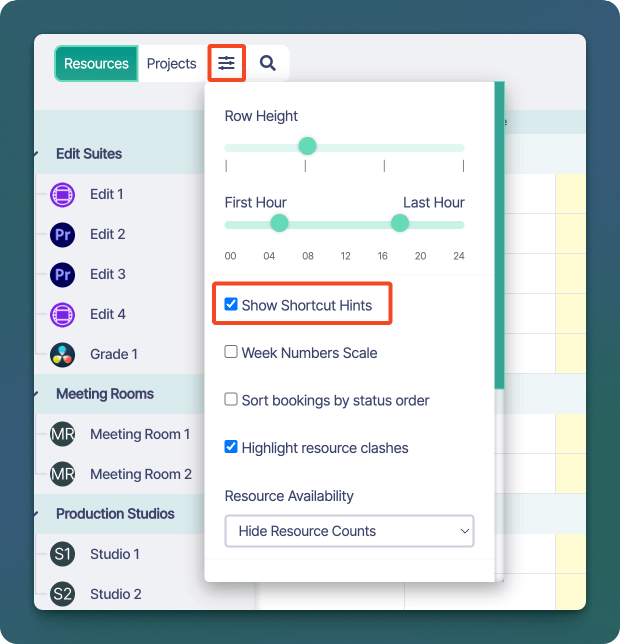
By default, Sonderplan will show shortcut hints on buttons. You can disable these hints by opening up the **Schedule User Preferences Dropdown** -> uncheck **Show Shortcut Hints**
<img src="https://mintcdn.com/sonderplan-b228cb35/AlTcSS4AzTYvuSH-/images/ui/schedule/sonderplan-show-shortcut-hints.png?fit=max&auto=format&n=AlTcSS4AzTYvuSH-&q=85&s=45cddc2eff7ac727b3c120e58300c9f1" alt="Sonderplan Show Shortcut Hints checkbox" width="620" height="644" data-path="images/ui/schedule/sonderplan-show-shortcut-hints.png" />
