> ## Documentation Index
> Fetch the complete documentation index at: https://docs.sonderplan.com/llms.txt
> Use this file to discover all available pages before exploring further.
# Project Rates
> Tailor service rates to your project’s specific resources for seamless, accurate billing
Project Rates let you define custom hour-, day-, and week-rates for any combination of services and resources on a per-project basis. Once set, every new or updated booking in that project picks up these rates automatically—no more manual overrides or billing surprises.
To add, edit or delete project rate schemes, you must be in a User Group with **Edit** access to both the **Project** and **Sales** modules
## Create Rate Scheme
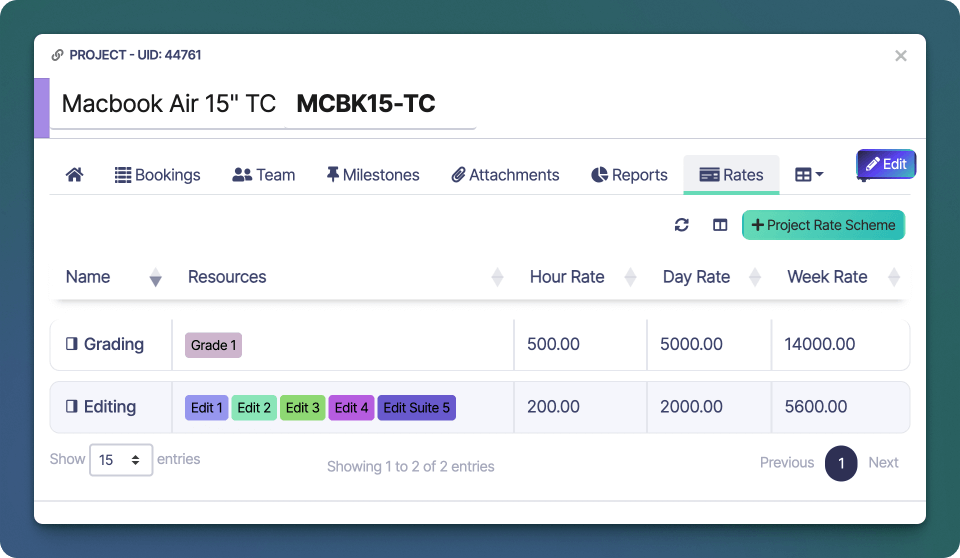
1. Open the [project](/en/projects/basics) you wish to create a new *Rate Scheme* for.
2. Click on the **Rates** tab -> **+ Project Rate Scheme**
 3. Enter a short **name** for the rate scheme, eg "Editing", "Grading" or "Sound Post"
4. In the **Rates** tab, enter **buy** / **sell** rates for the **hour**, **day** and **week**
3. Enter a short **name** for the rate scheme, eg "Editing", "Grading" or "Sound Post"
4. In the **Rates** tab, enter **buy** / **sell** rates for the **hour**, **day** and **week**
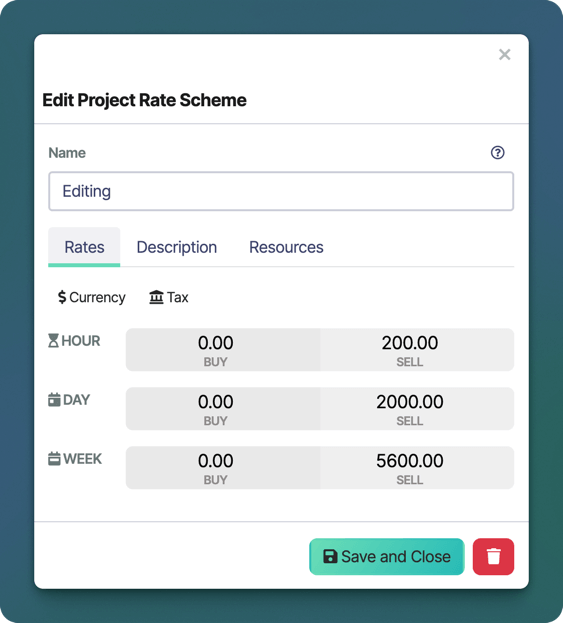 5. Confirm the set **currency** and **tax** settings are correct
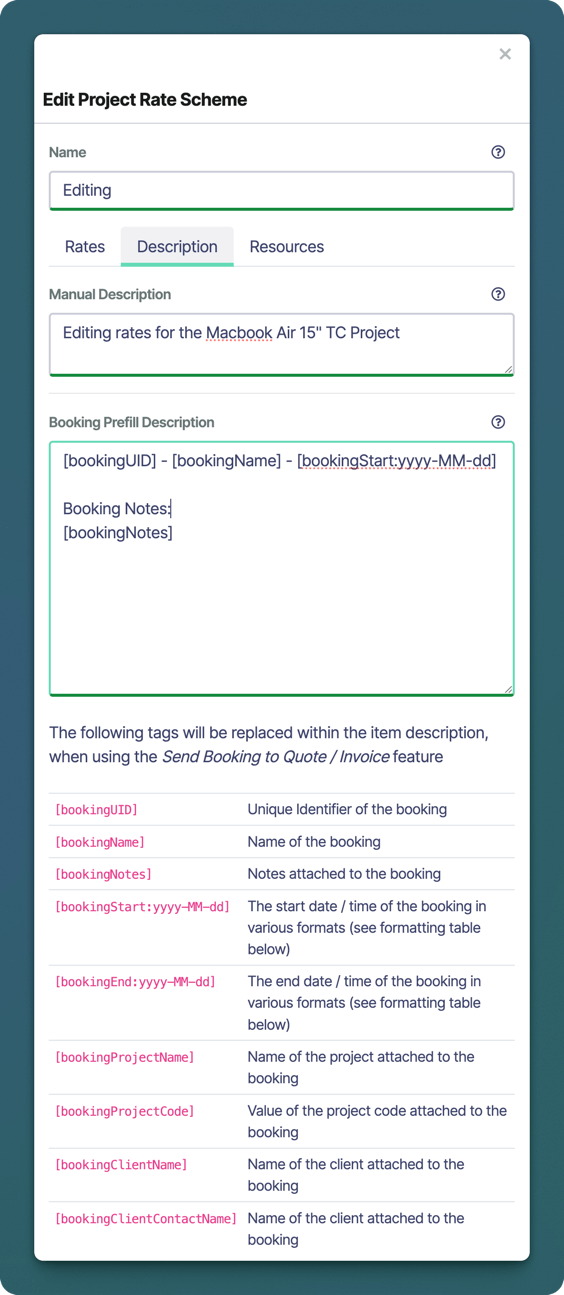
6. Optionally, on the **Description** tab, enter a **description** to provide more info on the rate scheme
5. Confirm the set **currency** and **tax** settings are correct
6. Optionally, on the **Description** tab, enter a **description** to provide more info on the rate scheme
 7. Click the **Resources** tab and select any **resources** that should be in the scope of this rate scheme.
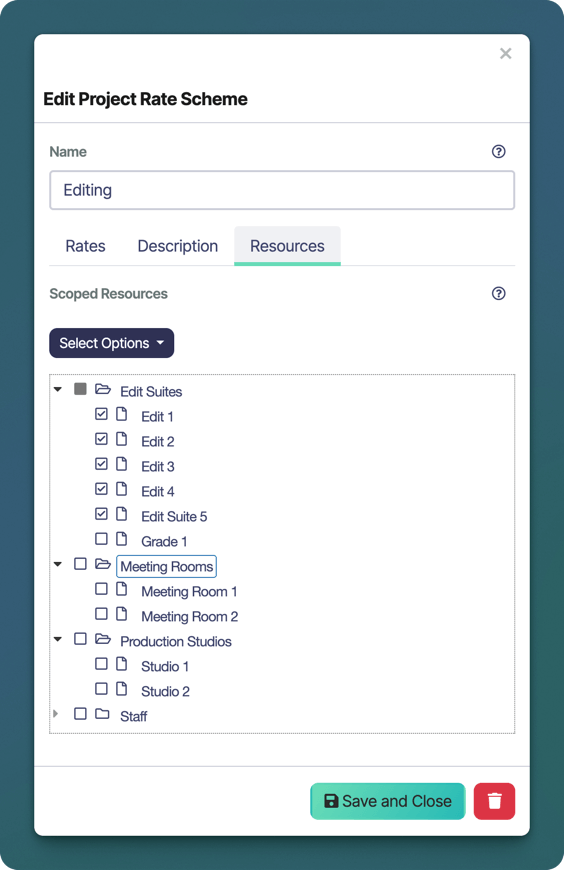 8. Finally click **Save and Close** to save and exit from the New Rate Scheme window
### Booking Prefill Description
You can customise the description automatically prefilled when converting one or more bookings into a quote or invoice. Shortcodes let you insert placeholders that are dynamically replaced as each booking is added.
#### Shortcodes
| Placeholder | Description |
| ---------------------------- | ------------------------------------------------------------------------------------ |
| `[bookingUID]` | Unique Identifier of the booking |
| `[bookingName]` | Name of the booking |
| `[bookingNotes]` | Notes attached to the booking |
| `[bookingStart:yyyy-MM-dd]` | The start date / time of the booking in various formats (see formatting table below) |
| `[bookingEnd:yyyy-MM-dd]` | The end date / time of the booking in various formats (see formatting table below) |
| `[bookingProjectName]` | Name of the project attached to the booking |
| `[bookingProjectCode]` | Value of the project code attached to the booking |
| `[bookingClientName]` | Name of the client attached to the booking |
| `[bookingClientContactName]` | Name of the client attached to the booking |
#### Date Formats
The following date formats can be used in the `[bookingStart:]` and `[bookingEnd:]` shortcodes outlined in the table above.
| Token | Description |
| ------ | ----------------------------------- |
| `yyyy` | 4-digit year (e.g. 2025) |
| `yy` | 2-digit year (e.g. 25) |
| `MMMM` | Full month name (e.g. June) |
| `MMM` | Abbreviated month name (e.g. Jun) |
| `MM` | Month number, zero-padded (01–12) |
| `M` | Month number (1–12) |
| `dd` | Day of month, zero-padded (01–31) |
| `d` | Day of month (1–31) |
| `HH` | Hour (24-hour), zero-padded (00–23) |
| `H` | Hour (24-hour) (0–23) |
| `hh` | Hour (12-hour), zero-padded (01–12) |
| `h` | Hour (12-hour) (1–12) |
| `mm` | Minute, zero-padded (00–59) |
| `m` | Minute (0–59) |
## Edit Rate Scheme
1. To edit a rate scheme, click on the **Rates** tab then click on the **name** of the Rate Scheme you wish to edit.
2. Make the desired changes to the rate scheme, including the name, description, currency, tax, rates or scoped resources.
3. Finally click **Save and Close** to save and exit from the New Rate Scheme window.
## Delete Rate Scheme
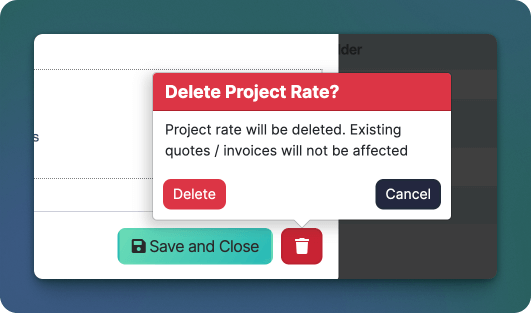
1. To delete a rate scheme, click on the **Rates** tab then click on the **name** of the Rate Scheme you wish to delete.
8. Finally click **Save and Close** to save and exit from the New Rate Scheme window
### Booking Prefill Description
You can customise the description automatically prefilled when converting one or more bookings into a quote or invoice. Shortcodes let you insert placeholders that are dynamically replaced as each booking is added.
#### Shortcodes
| Placeholder | Description |
| ---------------------------- | ------------------------------------------------------------------------------------ |
| `[bookingUID]` | Unique Identifier of the booking |
| `[bookingName]` | Name of the booking |
| `[bookingNotes]` | Notes attached to the booking |
| `[bookingStart:yyyy-MM-dd]` | The start date / time of the booking in various formats (see formatting table below) |
| `[bookingEnd:yyyy-MM-dd]` | The end date / time of the booking in various formats (see formatting table below) |
| `[bookingProjectName]` | Name of the project attached to the booking |
| `[bookingProjectCode]` | Value of the project code attached to the booking |
| `[bookingClientName]` | Name of the client attached to the booking |
| `[bookingClientContactName]` | Name of the client attached to the booking |
#### Date Formats
The following date formats can be used in the `[bookingStart:]` and `[bookingEnd:]` shortcodes outlined in the table above.
| Token | Description |
| ------ | ----------------------------------- |
| `yyyy` | 4-digit year (e.g. 2025) |
| `yy` | 2-digit year (e.g. 25) |
| `MMMM` | Full month name (e.g. June) |
| `MMM` | Abbreviated month name (e.g. Jun) |
| `MM` | Month number, zero-padded (01–12) |
| `M` | Month number (1–12) |
| `dd` | Day of month, zero-padded (01–31) |
| `d` | Day of month (1–31) |
| `HH` | Hour (24-hour), zero-padded (00–23) |
| `H` | Hour (24-hour) (0–23) |
| `hh` | Hour (12-hour), zero-padded (01–12) |
| `h` | Hour (12-hour) (1–12) |
| `mm` | Minute, zero-padded (00–59) |
| `m` | Minute (0–59) |
## Edit Rate Scheme
1. To edit a rate scheme, click on the **Rates** tab then click on the **name** of the Rate Scheme you wish to edit.
2. Make the desired changes to the rate scheme, including the name, description, currency, tax, rates or scoped resources.
3. Finally click **Save and Close** to save and exit from the New Rate Scheme window.
## Delete Rate Scheme
1. To delete a rate scheme, click on the **Rates** tab then click on the **name** of the Rate Scheme you wish to delete.