> ## Documentation Index
> Fetch the complete documentation index at: https://docs.sonderplan.com/llms.txt
> Use this file to discover all available pages before exploring further.
# My Account
> Manage your name, security credentials, user interface settings and notification preferences
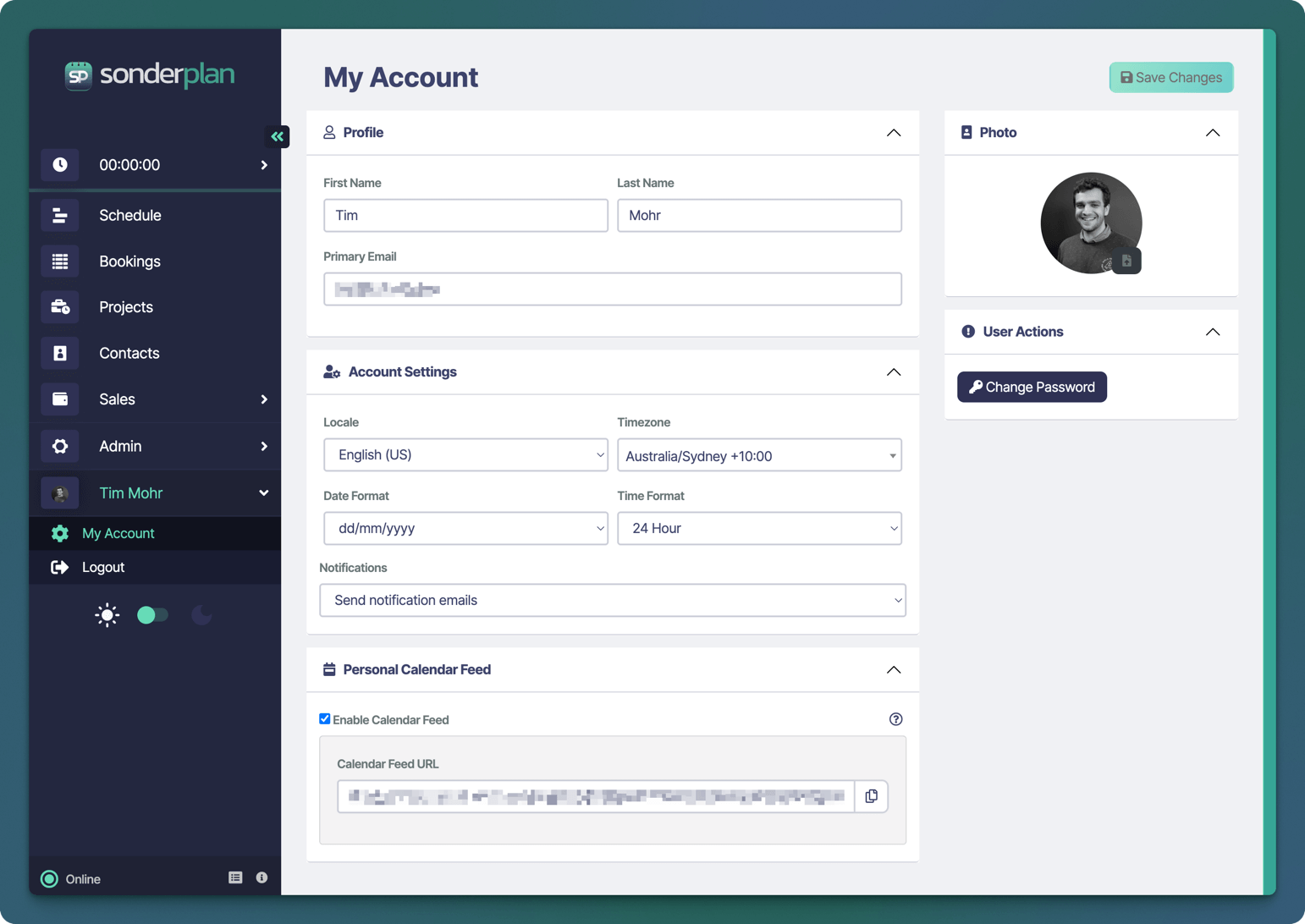
To open the *My Account* page, in the main sidebar menu, click on **your Name** --> **My Account**.
 ## Profile
Use the Profile section to review and update your basic identity and primary login email:
### First Name & Last Name
Enter or correct the name you’d like displayed throughout Sonderplan (e.g. in booking confirmations).
### Primary Email
Your main contact and login address. To change this, replace the current email and click Save Changes. A confirmation email may be sent to verify the new address.
## Account Settings
Control regional formats, time handling, and notifications:
| Setting | Description |
| ----------------- | -------------------------------------------------------------------------------------------------------------------------------------- |
| **Locale** | Choose your language and regional conventions (e.g. English (US), Deutsch (DE)). Affects system UI text and currency formats. |
| **Timezone** | Select your local timezone (e.g. Australia/Sydney +10:00). All booking times, calendar feeds, and timestamps will display accordingly. |
| **Date Format** | Pick your preferred date notation (e.g. `dd/mm/yyyy`, `mm/dd/yyyy`, `yyyy-mm-dd`). |
| **Time Format** | Choose 12-hour or 24-hour clock display. |
| **Notifications** | Control how Sonderplan contacts you about activity: `Send notification emails (default)`, `Do not send emails` |
## Personal Calendar Feed
Subscribe to your bookings in external calendar apps (e.g. Google Calendar, Outlook):
1. **Enable Calendar Feed** - Tick the checkbox to activate your personal iCal feed.
2. **Calendar Feed URL** - Copy this secure URL and paste it into your calendar application’s “Subscribe to a calendar” field.
Treat this link like a password, do not share it publicly.
## Photo
Upload or update your profile picture, which appears next to your name in Sonderplan:
1. Click the avatar area to open the file picker.
2. Select a square portrait image (JPEG or PNG).
3. The new photo will display immediately—click Save Changes to finalize.
## User Actions
### Change Password
1. Click **Change Password** to open a secure dialog.
2. Enter your **current password**, then choose and confirm a **new, strong password**.
3. Click **Save** to update.
## Profile
Use the Profile section to review and update your basic identity and primary login email:
### First Name & Last Name
Enter or correct the name you’d like displayed throughout Sonderplan (e.g. in booking confirmations).
### Primary Email
Your main contact and login address. To change this, replace the current email and click Save Changes. A confirmation email may be sent to verify the new address.
## Account Settings
Control regional formats, time handling, and notifications:
| Setting | Description |
| ----------------- | -------------------------------------------------------------------------------------------------------------------------------------- |
| **Locale** | Choose your language and regional conventions (e.g. English (US), Deutsch (DE)). Affects system UI text and currency formats. |
| **Timezone** | Select your local timezone (e.g. Australia/Sydney +10:00). All booking times, calendar feeds, and timestamps will display accordingly. |
| **Date Format** | Pick your preferred date notation (e.g. `dd/mm/yyyy`, `mm/dd/yyyy`, `yyyy-mm-dd`). |
| **Time Format** | Choose 12-hour or 24-hour clock display. |
| **Notifications** | Control how Sonderplan contacts you about activity: `Send notification emails (default)`, `Do not send emails` |
## Personal Calendar Feed
Subscribe to your bookings in external calendar apps (e.g. Google Calendar, Outlook):
1. **Enable Calendar Feed** - Tick the checkbox to activate your personal iCal feed.
2. **Calendar Feed URL** - Copy this secure URL and paste it into your calendar application’s “Subscribe to a calendar” field.
Treat this link like a password, do not share it publicly.
## Photo
Upload or update your profile picture, which appears next to your name in Sonderplan:
1. Click the avatar area to open the file picker.
2. Select a square portrait image (JPEG or PNG).
3. The new photo will display immediately—click Save Changes to finalize.
## User Actions
### Change Password
1. Click **Change Password** to open a secure dialog.
2. Enter your **current password**, then choose and confirm a **new, strong password**.
3. Click **Save** to update.